

MES vs ERP: Where Production Execution Fits


ERP systems play a critical role in manufacturing. They connect customer orders, purchasing, inventory, materials, production requirements, and other business processes across the company.
Knowing what needs to be made is not the same as managing what is happening on the shop floor.
That is where a Manufacturing Execution System (MES) fits. MES supports shop floor execution.
The MES vs ERP question is not just about comparing two software tools. It is about knowing where business planning ends, where production execution begins, and how information can move between enterprise systems and manufacturing work.
For manufacturers reviewing their tech stack, this difference can show whether the current ERP environment gives enough shop-floor visibility and control, or whether a dedicated MES is needed.
What Is the Difference Between MES and ERP?
An Enterprise Resource Planning (ERP) system manages business information and processes. In manufacturing, that can include customer demand, purchasing, inventory, materials, bills of materials, routings, production orders, costing, and other enterprise data.
A Manufacturing Execution System (MES) focuses on production execution.
MES links production requirements with shop-floor work. It helps manufacturers manage, monitor, and capture what happens while products are being made.
Put simply:
ERP helps manage what the business needs to produce. MES helps connect those needs with how work is actually done on the shop floor.
ERP vs MES are not always competing systems. They can play complementary roles in a connected manufacturing setup.
Can ERP Handle Production Execution?
ERP systems can offer strong manufacturing features, and those features vary by vendor, module, and setup.
The real question is not whether ERP can support manufacturing. It is whether the system gives the depth of production execution, live visibility, and shop-floor data collection the operation needs.
ERP production execution can be enough in some plants, but not all.
After a work order is released, supervisors need status. Operators need the right production info. Production activity must be recorded. Downtime and waste may need to be logged. Quality information and tracking data may need to follow the product through production.
This is where the gap between enterprise management and detailed production execution becomes clear.
Where Does MES Fit in Production Execution?
MES works closer to the process. It links production orders, operators, equipment, and production data.
Work Order Execution
Production orders may come from ERP, but MES can move those requirements to the shop floor and support execution.
Operators and supervisors can see the right production info while work is recorded as it happens.
Real-Time Production Visibility
MES shows what is happening during production. It helps teams understand status and performance without waiting for delayed reports or manual entry.
Machine and Production Monitoring
Connecting production data with equipment data helps manufacturers see how machines and production processes are performing.
This gives a clearer view of production activity, downtime, and performance.
Product Tracking and Quality
MES can capture production data as products move through manufacturing, supporting tracking, lineage, and production quality processes.
This helps connect what was planned with what was made, how it was made, and the data recorded during execution.
MES vs ERP: What Should Manufacturers Compare?
When comparing ERP manufacturing features with a dedicated MES, the buying team should look beyond a feature list.
The key question is how much execution depth the operation needs.
Evaluation Criteria | Traditional ERP Environment | OpRize MES |
|---|---|---|
Primary Role | Manage enterprise transactions and business processes | Support and connect production execution |
Production Orders | Create and manage production requirements | Bring work orders into shop-floor execution |
Production Visibility | Visibility depends on ERP features and data availability | Focused on production and shop-floor visibility |
Production Data Collection | Capabilities vary by ERP and setup | Captures production data during execution |
Machine Monitoring | Capabilities vary and may need other systems | Connects equipment and production data |
Downtime Tracking | Capabilities vary by plant | Supports capturing and analyzing downtime. |
OEE Monitoring | May need special tools or other systems | Supports OEE monitoring in the MES |
Tracking | Enterprise and material records vary by ERP | Supports production tracking and lineage |
Production Quality | Quality features vary by ERP or module | Supports defined shop-floor quality processes |
Shop-Floor Experience | Part of a larger enterprise environment | Built around manufacturing execution |
ERP Relationship | Core business system | Complements ERP at the production execution layer |
This comparison should not be taken to mean ERP cannot provide advanced manufacturing features. Some ERP systems do offer broad production support.
Instead, manufacturers should evaluate where work happens, what operators and supervisors need, how production data is captured, and how fast teams can see what is actually happening in production.
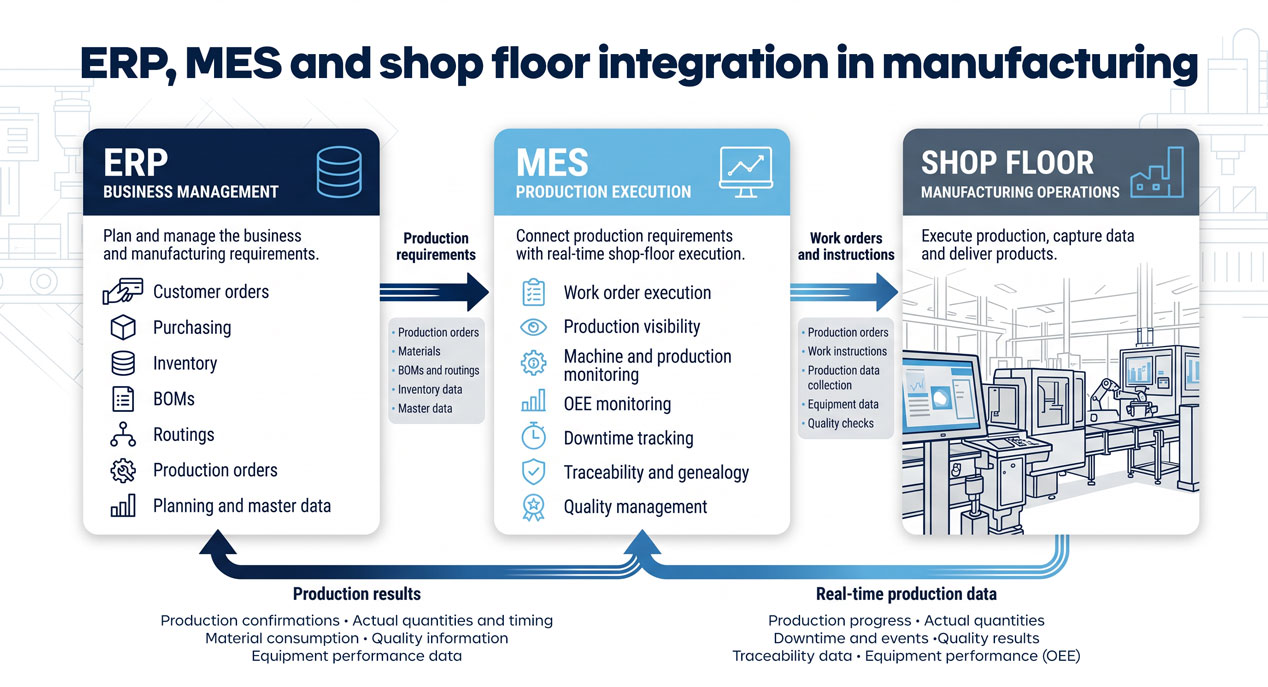
How Do MES and ERP Work Together?
MES ERP integration links business needs with production execution.
A simple flow can look like this:
ERP → MES → Shop Floor
and:
Shop Floor → MES → ERP
ERP can provide production requirements and relevant master or transaction data. MES uses the data it needs for production execution and captures operational results as work happens.
Relevant production results can then move back to enterprise systems.
The result is a more connected link between what the business expects to make and what production actually does.
Do Manufacturers Need MES If They Already Have ERP?
Not always.
The decision should start with the company's needs, not with the idea that another software system is required.
If the current ERP gives enough production execution, shop-floor visibility, data collection, tracking, and performance data, adding MES may not solve a real issue.
MES becomes more useful when gaps appear between enterprise production planning and day-to-day shop floor execution.
Common signs include:
- paper-based or spreadsheet-driven production processes
- limited live production visibility
- heavy manual production data collection
- difficulty tracking work order progress
- missing downtime information
- limited equipment performance visibility
- hard-to-follow product tracking
- disconnected quality information
The question for the buying team becomes:
Can our current manufacturing systems connect production requirements with what is actually happening on the shop floor?
Connect Production Execution with OpRize MES
OpRize MES helps manufacturers connect production data, equipment, and shop-floor work in one manufacturing execution environment.
Its capabilities support work order management, machine monitoring, production tracking, downtime tracking, waste tracking, OEE monitoring, tracking, and quality control.
Rather than replacing ERP, OpRize MES can complement the enterprise system by providing the production execution layer needed to connect business needs with manufacturing work.
For manufacturers who want more visibility and control, the goal is not just to add another system.
It is to build a more connected flow from production needs to execution to performance.
Ready to See OpRize MES in Action?
Whether you want to explore how OpRize MES fits your production environment or see the platform live, we offer two easy ways to get started.
- Book a Discovery Call or a Demo: Contact Us, Premier Tech Digital
- Explore OpRize MES: OpRize MES, Premier Tech Digital
- Watch Feature Videos: Videos, Premier Tech Digital
Frequently Asked Questions About MES, ERP and OpRize MES
No. OpRize MES is designed to complement the role of an ERP rather than replace its core business functions.
ERP can keep managing business and production requirements, while OpRize MES focuses on production execution, shop-floor visibility, and manufacturing data.
Managing a production order and executing it on the shop floor are related but different jobs.
Manufacturers should check whether their ERP gives the level of work-order execution, production visibility, data collection, equipment monitoring, tracking, and performance data the operation needs.
If real gaps remain between the production order and actual shop-floor execution, MES may add value.
OpRize MES is built to work within a broader manufacturing tech setup.
The exact integration plan depends on the ERP, manufacturing process, needed data flows, and project scope. The goal is to connect relevant enterprise data with production execution, not duplicate the ERP.
Start with operational needs rather than software categories.
Evaluate work-order execution, production visibility, data collection, machine links, downtime, OEE, tracking, quality processes, operator experience, integration needs, and reporting needs.
IT should review architecture and integration, while Operations should decide whether the solution gives the depth and visibility needed on the shop floor.
No. MES needs depend on manufacturing complexity and operational needs, not company size alone.
A manufacturer struggling with disconnected production data, manual processes, limited visibility, or tracking issues may have a stronger MES case than a larger manufacturer whose systems already meet those needs.
Look for the gap between what the ERP knows should happen and what your production teams can see, control, and capture while shop-floor execution is happening.
If operators and supervisors still depend on paper, spreadsheets, manual reports, or disconnected systems to understand production, that gap is worth looking into.
An MES review should then show whether closing it can improve production visibility, execution, and operational performance.
ERP generally manages enterprise-level planning and business requirements, including what needs to be produced. MES focuses on the production execution layer, helping teams connect those requirements with what operators, machines, and production processes are actually doing on the shop floor.
An MES becomes especially valuable when there is a gap between production planning and production execution. Signs of that gap can include limited live visibility, manual data collection, paper-based processes, incomplete downtime information, disconnected quality data, or difficulty tracking work-order progress.
ERP can send production requirements, master data, or relevant transactional information to MES. MES can then support shop floor execution and capture operational results, which may flow back to enterprise systems so business teams have a clearer view of what was actually produced.
No. The article emphasizes that manufacturers should look beyond feature lists and evaluate operational needs. Important considerations include execution depth, shop-floor visibility, data capture, operator and supervisor requirements, machine links, tracking, quality processes, and how quickly teams can understand production performance.
About the author
François Foster is Director of Product Development at Premier Tech Digital, where he has spent over 15 years architecting and delivering advanced manufacturing technology solutions.
A seasoned Software Architect and Product Development Manager, François specializes in Manufacturing Execution Systems (MES) and Industrial IoT (IIoT) product development, with deep expertise in cloud-native solution design, ERP-MES integration, and Agile team leadership.
As Product Owner for Premier Tech Digital's IIoT platforms, he leads cross-functional development teams with a focus on scalability, resilience, and continuous improvement.
His career spans over two decades in the manufacturing technology space, from MES consulting and ERP engineering to enterprise-scale system architecture, making him one of the most experienced voices in smart manufacturing solutions in Canada.


Join the Future of Manufacturing
Don’t get left behind in the rapidly evolving manufacturing industry 4.0. Partner with Premier Tech Digital and unlock the potential of Industry 4.0 with our solutions and expertise. Experience the future of manufacturing today!
