

APS vs ERP: What Manufacturers Need to Know

Manufacturers rely on ERP systems to connect critical business processes, from customer orders and purchasing to inventory, materials and production. But as manufacturing complexity increases, production planners may need more advanced capabilities to turn production requirements into feasible schedules.
This is where Advanced Planning and Scheduling (APS) software comes into play.
The APS vs ERP question is not simply about choosing one system over another. Both can support manufacturing planning, but they address different needs. Understanding those differences can help manufacturers determine whether their current planning environment provides the capacity visibility, scheduling intelligence and optimization capabilities required to manage production effectively.
What Is the Difference Between APS and ERP?
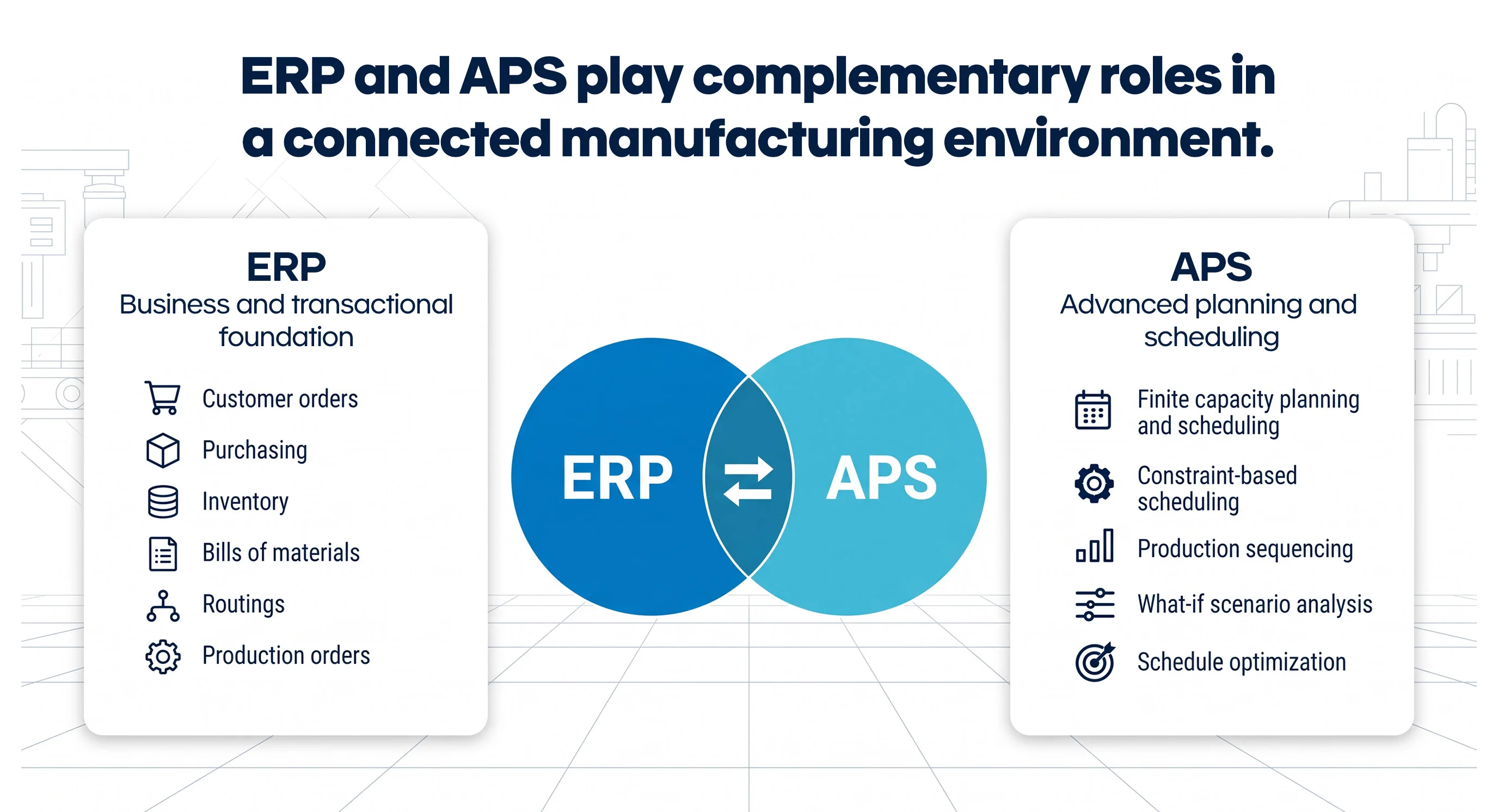
An Enterprise Resource Planning (ERP) system connects business information and processes across the organization. In manufacturing, this can include customer orders, purchasing, inventory, bills of materials, routings and production orders.
An Advanced Planning and Scheduling (APS) system focuses specifically on production planning and scheduling. It helps manufacturers evaluate demand against available capacity, account for production constraints and generate feasible production schedules.
Put simply, ERP provides the business and transactional foundation, while APS provides specialized capabilities for complex production planning and scheduling decisions.
Rather than competing technologies, ERP and APS can play complementary roles within a connected manufacturing environment.
Can ERP Handle Production Planning and Scheduling?
Yes. Many ERP systems include production planning and scheduling capabilities, with functionality varying between systems, modules and configurations.
The more important question is whether those capabilities match the complexity of the manufacturing environment.
A planner may need to coordinate multiple work centers, competing production orders, limited capacity, bottlenecks, setup requirements and changing customer priorities. When one constraint changes, the impact can extend across multiple orders and resources.
In more complex environments, manufacturers may need specialized capabilities to continuously evaluate capacity, constraints and scheduling alternatives.
What Does APS Add to Production Planning and Scheduling?
APS software is designed to help planners build production plans and schedules around the operational realities of the factory.
Finite Capacity Planning and Scheduling
Finite capacity scheduling considers the capacity available across production resources. This helps planners identify potential overloads, understand where capacity is constrained and build more realistic production schedules.
Constraint-Based Production Scheduling
Manufacturing schedules can be affected by machine availability, work-center capacity, resource availability, production routings, operation dependencies, setup requirements and due dates.
APS helps planners account for relevant manufacturing constraints when generating and adjusting production schedules.
Production Sequencing
The sequence in which orders are produced can significantly affect manufacturing performance. APS can help planners optimize production sequencing according to operational requirements, priorities and constraints.
What-If Scenario Analysis
Demand changes. Priorities shift. Capacity becomes constrained. Bottlenecks affect the schedule.
What-if simulation allows planners to evaluate alternative scenarios and understand their potential impact before modifying the production schedule.
APS vs ERP Production Planning: What Should Manufacturers Compare?
When evaluating an ERP's production planning and scheduling capabilities, manufacturers should look beyond whether the system can technically create a schedule.
The buying center should evaluate how effectively the solution can model manufacturing constraints, manage capacity, optimize production sequences, respond to changes and support planners in making complex scheduling decisions.
Evaluation Criteria | Traditional ERP Planning | SyncRun APS |
|---|---|---|
Primary Role | Manage enterprise transactions, production requirements and business processes | Optimize manufacturing planning and scheduling decisions |
Production Capacity | Often supports capacity planning, with depth depending on ERP and modules | Designed around finite capacity and available manufacturing resources |
Manufacturing Constraints | Constraint modeling varies by ERP and configuration | Designed to incorporate manufacturing constraints into planning and scheduling |
Finite Capacity Scheduling | May require advanced planning modules or additional configuration | Core APS planning and scheduling capability |
Production Sequencing | Capabilities vary by ERP planning environment | Optimizes sequences based on operational requirements and constraints |
What-If Simulation | Availability and sophistication vary | Enables planners to evaluate alternative production scenarios |
Schedule Optimization | May be available through advanced ERP functionality | Purpose-built for production schedule optimization |
Response to Changes | Depends on system architecture and configuration | Designed to help planners recalculate and evaluate scheduling alternatives |
Planner Experience | Planning may operate within a broader ERP environment | Dedicated environment focused on production planning and scheduling |
ERP Relationship | Core transactional and business system | Complements ERP with specialized planning and scheduling capabilities |
The objective is not to assume that an ERP cannot perform advanced scheduling. Manufacturers should determine how much planning depth they require, what functionality is included in their ERP environment and how effectively planners can use those capabilities to manage day-to-day production complexity.
Operations should evaluate planning performance and usability, planners should assess scheduling depth, IT should consider integration and architecture, and finance should consider implementation effort, total cost and expected business value.
How Do ERP, APS and MES Work Together?
ERP, APS and Manufacturing Execution Systems (MES) can support different layers of manufacturing operations:
ERP → APS → MES / Production Execution
ERP manages business and production requirements.
APS transforms those requirements into plans and schedules based on available capacity, priorities and manufacturing constraints.
MES supports production execution and provides visibility into what is actually happening on the shop floor.
The exact architecture and data flows depend on the manufacturer's technology environment, but connecting these systems can help reduce the gap between business requirements, production planning and shop-floor execution.
When Should Manufacturers Consider APS?
Manufacturers should consider APS when production planning becomes increasingly difficult to manage with existing systems and processes.
Common indicators include frequent manual rescheduling, spreadsheet-dependent planning, difficulty evaluating available capacity, overloaded bottlenecks, complex production sequencing, rapidly changing priorities and persistent challenges meeting customer delivery dates.
The key question becomes:
Does our current planning environment give our planners the capabilities they need to create feasible production schedules based on actual capacity, priorities and manufacturing constraints?
When important gaps remain, APS can provide an additional layer of planning intelligence that complements the ERP environment.
Optimize Production Planning and Scheduling with SyncRun APS
SyncRun APS helps manufacturers optimize production planning and scheduling by considering capacity, manufacturing constraints and production priorities.
It provides capabilities for capacity planning, finite capacity scheduling, production sequencing, optimization and scenario analysis within a purpose-built Advanced Planning and Scheduling environment.
By connecting production requirements with the realities of manufacturing operations, SyncRun APS helps planning teams build more feasible schedules and respond more effectively when production conditions change.
Ready to Transform Your Production Planning?
Join manufacturers like Groupe OSI who replaced manual spreadsheets with intelligent advanced planning and scheduling, and never looked back.
- Book a Discovery Call or a Demo: Contact Us, Premier Tech Digital
- Explore SyncRun APS: SyncRun APS, Premier Tech Digital
- Watch Feature Videos: Videos, Premier Tech Digital
Frequently Asked Questions About APS, ERP and SyncRun APS
No. SyncRun APS is designed to complement the ERP rather than replace its core business functions.
ERP can continue to manage customer demand, production orders, inventory and transactional data, while SyncRun APS provides specialized capabilities for production planning, capacity and scheduling.
First determine whether your ERP's planning capabilities meet the complexity of your manufacturing environment.
If planners can already create feasible schedules, model required constraints, optimize sequences, evaluate capacity and respond efficiently to production changes, an additional planning system may not be necessary.
SyncRun APS becomes relevant when manufacturers need greater depth in finite capacity scheduling, capacity planning, production sequencing, schedule optimization and what-if simulation.
Yes. SyncRun APS is intended to operate as part of the manufacturer's broader technology environment, allowing manufacturers to preserve ERP as a core business system while adding specialized Advanced Planning and Scheduling capabilities.
Consider production constraints, resources and work centers, bottlenecks, sequence-dependent requirements, frequency of schedule changes, capacity visibility, what-if analysis and the amount of manual intervention required from planners.
The buying center should also evaluate integration, implementation effort, planner adoption and the ability to support future manufacturing complexity.
Not necessarily. The need for APS is driven more by production complexity than company size.
Manufacturers dealing with constrained resources, complex routings, frequent priority changes, bottlenecks or difficult sequencing decisions may benefit from advanced planning capabilities regardless of company size.
Start with the production planning problems you need to solve rather than the software category.
Evaluate whether your ERP environment can produce feasible schedules using actual manufacturing constraints, respond efficiently to disruptions, evaluate alternative scenarios and give planners sufficient control over capacity and sequencing.
If important gaps remain, comparing those requirements directly with SyncRun APS provides a more meaningful evaluation than comparing feature lists alone.
About the Author
Jean-Pierre Fontaine started with a vision: make production planning simpler and smarter for manufacturers. He founded Arima, built Syncrun from the ground up, and never stopped improving it.
Today, as Product Director of Syncrun APS at Premier Tech Digital, he brings over 30 years of real manufacturing expertise to every feature and update. Outside of work, Jean-Pierre recharges by traveling and spending time in the great outdoors.
Connect with Jean-Pierre Fontaine on LinkedIn


Join the Future of Manufacturing
Don’t get left behind in the rapidly evolving manufacturing industry 4.0. Partner with Premier Tech Digital and unlock the potential of Industry 4.0 with our solutions and expertise. Experience the future of manufacturing today!
